Cookie policy review checklist for mobile apps teams
Mobile apps collect data the moment a user taps "Install," yet most teams treat cookie and tracking policies as an afterthought, something legal drafts the nigh

Photo by Mikhail Nilov from Pexels
Mobile apps collect data the moment a user taps "Install," yet most teams treat cookie and tracking policies as an afterthought, something legal drafts the night before launch. The result is vague language, missing disclosures, and real regulatory risk. This checklist gives product managers, developers, and QA leads a repeatable, step-by-step process for reviewing cookie policies before every release so nothing slips through the cracks.
TL;DR
- Mobile apps use cookies, SDKs, and device identifiers that all need clear disclosure in a cookie or tracking policy.
- A structured review checklist prevents last-minute scrambles and reduces the chance of regulatory fines.
- Every team member, from engineering to legal, should own at least one checkpoint in the review flow.
- Tools like Terms Doctor can automatically scan policies for red flags such as forced arbitration, hidden auto-renewal, and AI data-training clauses.
- This article provides a ready-to-use checklist, a step-by-step review process, and an FAQ to get your team started today.
Why mobile apps need a dedicated cookie policy review

When people hear "cookies," they think of web browsers. But mobile apps rely on an even broader set of tracking technologies: advertising IDs (IDFA, GAID), local storage databases, session tokens stored in secure enclaves, and third-party SDK cookies that fire inside in-app WebViews. Each of these mechanisms can fall under cookie-consent regulations like the ePrivacy Directive, GDPR, CCPA/CPRA, and Brazil's LGPD.
A dedicated review matters for three reasons:
- Regulatory overlap. A single app distributed globally can be subject to dozens of privacy frameworks simultaneously. A cookie policy that satisfies GDPR may still violate California's "Do Not Sell" requirements.
- App store enforcement. Both Apple's App Store and Google Play now require a privacy "nutrition label." Inconsistencies between your label and your actual cookie policy can lead to rejection or removal.
Key takeaway: Treating your mobile cookie policy as a living document, reviewed before every release, is the single most effective way to stay compliant across jurisdictions.
The complete cookie policy review checklist
Below is the checklist your team can copy into your project management tool and assign owners to each item. Every checkbox maps to a concrete, verifiable action.
Cookie Policy Review Checklist for Mobile Apps
Your progress is saved automatically in your browser.
Step-by-step review process for your team
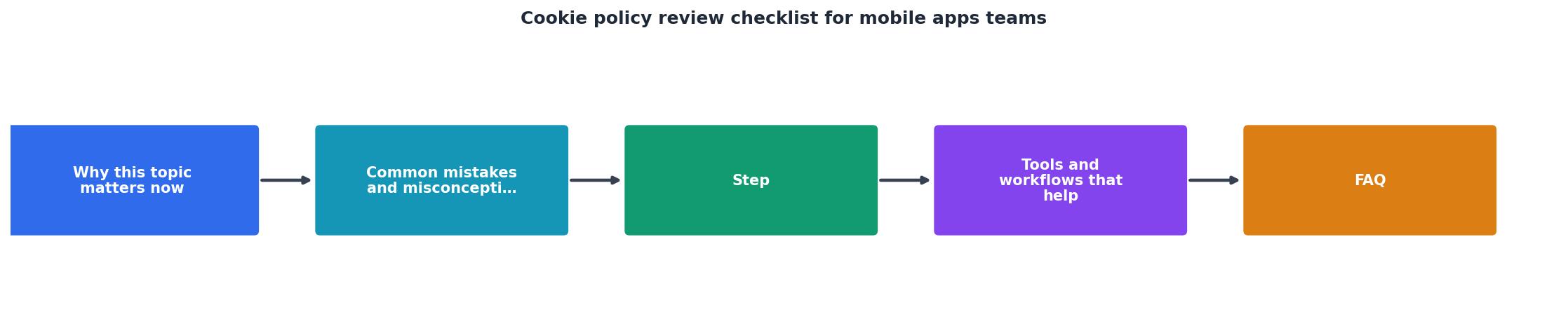
Follow these steps in order. Assign each step to a specific role so accountability is clear.
Step 1, SDK and tracker audit (Engineering)
Run a network traffic analysis on a staging build using a proxy tool such as Charles Proxy or mitmproxy. Log every outbound request that sets a cookie, writes to local storage, or transmits a device identifier. Export the list into a shared spreadsheet with columns for: SDK name, data collected, purpose, and cookie duration.
Step 2, Classification workshop (Product + Legal)
Gather product managers and legal counsel for a 30-minute classification session. Walk through the spreadsheet row by row and tag each tracker as strictly necessary, analytics, advertising, or functional. Anything tagged advertising or analytics must be behind a consent gate.
Step 3, Policy draft or update (Legal)
Legal updates the cookie policy document to reflect the current tracker inventory. Every SDK should be named explicitly. Durations should be stated in human-readable terms ("expires after 30 days," not "persistent"). Region-specific sections, such as a CCPA "Do Not Sell My Personal Information" paragraph, should be clearly separated with their own headings.
Step 4, Consent mechanism QA (QA / Engineering)
QA verifies that the consent banner or modal appears on first launch, that declining non-essential cookies actually prevents those SDKs from initializing, and that consent records are stored server-side. Test on both iOS and Android, including edge cases like app updates where a user previously granted consent under an older policy version.
Step 5, Automated policy scan (Whole team)
Before publishing, paste the final policy URL into a tool like Terms Doctor. Its 101 consumer-protection checks will flag issues such as forced arbitration clauses, auto-renewal traps, or language that grants the company rights to use data for AI model training, problems that are easy to miss in a manual read-through.
Step 6, Sign-off and schedule next review
The product owner signs off on the updated policy. Log the review date, the app version, and the policy version in your compliance tracker. Set a calendar reminder for the next review, ideally tied to your next release milestone.
Common red flags to watch for

Even well-intentioned teams can introduce problematic language. Here are the red flags that appear most often during cookie policy reviews:
- Blanket consent language. Phrases like "By using this app you agree to all cookies" do not meet GDPR's standard for freely given, specific, informed consent.
- Missing SDK disclosures. If your app includes Facebook SDK, Firebase Analytics, or AppsFlyer but the policy only mentions "third-party analytics providers," regulators may consider the disclosure insufficient.
- No opt-out mechanism. Telling users they can "manage cookies in their browser settings" is meaningless inside a native mobile app. You need an in-app toggle or a link to OS-level privacy controls.
- Outdated durations. If you switched from a 90-day analytics cookie to a 365-day one two releases ago but never updated the policy, you have a compliance gap.
- Silent policy updates. Changing the cookie policy without notifying existing users can violate GDPR Article 13 requirements and erode user trust.
"The only solution with true end-to-end encryption, others just sign updates", Capgo [1].>, U.S. Privacy Laws: Mobile App Checklist
Region-specific considerations
Different jurisdictions impose different rules. Your checklist should include region-specific line items when your app is available in any of these markets:
| Region | Key requirement | Checklist action |
|---|---|---|
| EU / EEA (GDPR + ePrivacy) | Prior opt-in consent for non-essential cookies | Verify consent modal blocks SDK init until user accepts |
| California (CCPA / CPRA) | "Do Not Sell or Share My Personal Information" link | Add in-app link and honor Global Privacy Control signal |
| Brazil (LGPD) | Legal basis for each processing activity | Map each cookie to a lawful basis in the policy |
| Canada (PIPEDA / Bill C-27) | Meaningful consent and plain-language disclosure | Run readability check; aim for Grade 8 reading level |
| UK (UK GDPR + PECR) | Substantially mirrors EU rules post-Brexit | Maintain a separate UK-specific data controller section |
How Terms Doctor fits into your workflow
Terms Doctor is a free browser extension for Chrome, Edge, Brave, Opera, and Vivaldi that automatically finds terms of service and privacy policies on any website, including the web-hosted versions of your own mobile app policies. Once it locates the document, it runs 101 consumer-protection checks and assigns an A-F grade with plain-language explanations for every flagged clause.
For mobile apps teams, this means you can:
- Scan your own policy before each release to catch forced-arbitration language, auto-renewal traps, or AI-training data clauses that crept in during a legal template update.
- Compare vendor policies side by side when evaluating new SDKs, if an analytics provider scores an F, that risk transfers to your app.
- Track changes over time so you know the instant a third-party SDK vendor modifies their terms in a way that affects your compliance posture.
Frequently Asked Questions
Additional Resources
- U.S. Privacy Laws: Mobile App Checklist - Ensure your mobile app complies with U.S. privacy laws by following this comprehensive checklist for data protection and user rights.
- Privacy Policy Requirements Checklist for Websites & Apps - Our privacy policy requirements checklist outlines the steps to ensure your privacy policy is legal and compliant with global privacy laws.
- Mobile App Security Checklists - Learn about mobile app security checklists - systematic & organized lists of security considerations, best practices, & measures for mobile apps.
Ready to Read Terms Before You Sign?
Terms Doctor finds terms of service on any site and grades them A-F in seconds.
Get Started“Terms Doctor flagged forced arbitration and AI training clauses in seconds. I finally know what I am agreeing to.”
Privacy-conscious shopper