Terms of service review checklist for mobile apps teams
If you're building or managing a mobile app, you know that terms of service aren't just legal theater, they're the contract between you and your users. Whether you're shipping a fitness tracker, a social network, or a productivity tool, your terms set expectations about data, billing, liability, and user rights. But reviewing and writing solid terms is hard, especially under shipping pressure. This guide gives mobile teams a practical checklist to audit their own terms, spot red flags before lau

Photo by https://kaboompics.com/ from Pexels
If you're building or managing a mobile app, you know that terms of service aren't just legal theater, they're the contract between you and your users. Whether you're shipping a fitness tracker, a social network, or a productivity tool, your terms set expectations about data, billing, liability, and user rights. But reviewing and writing solid terms is hard, especially under shipping pressure. This guide gives mobile teams a practical checklist to audit their own terms, spot red flags before launch, and stay on the right side of app store policies and consumer protection laws.
TL;DR
- Mobile app terms must cover user data collection, how you'll store and protect it, and whether you share it with third parties.
- Billing clauses need to spell out auto-renewal, cancellation, refund policies, and charges in plain language before users hit "subscribe."
- Privacy-conscious users increasingly abandon apps with dark patterns, unclear data-sharing rules, or forced arbitration clauses; transparent terms build trust.
- Use automated tools like Terms Doctor to flag 101 consumer-protection risks (arbitration, AI training clauses, hidden fees) without hiring a lawyer first.
- Review and update your terms every 6–12 months or whenever you add new features, integrate third-party SDKs, or change how you collect or use data.
Why mobile app terms matter more than ever
Mobile apps live in a unique legal space. Unlike a website you visit once, an app gets installed on a user's phone, often requests permission to access location, contacts, photos, and calendar data, and frequently handles payments or sensitive personal information. Regulators, app stores, and courts are paying close attention.
Apple's App Store Review Guidelines explicitly require apps to have a privacy policy and clear, accessible terms. Google Play enforces similar rules, plus stricter policies around billing transparency and data sharing. More importantly, users are wary: 63 percent of consumers are aware of possible pitfalls like data misuse and unfair policies, and as a result say they're uncomfortable signing up for services without knowing all the details. Vague or hidden terms don't just hurt trust, they invite legal challenges under laws like the California Consumer Privacy Act (CCPA), the European General Data Protection Regulation (GDPR), and the Children's Online Privacy Protection Act (COPPA).
Key takeaway: Clear, accessible terms protect your users, your business, and your app's reputation.
Understanding the core sections of mobile app terms

Mobile app terms aren't a one-size-fits-all document. The clauses you need depend on what your app does. But there are core sections every team should include and review carefully:
Scope and Eligibility
Who can use your app? Are there age restrictions? Does your app comply with COPPA if children under 13 might use it? State your minimum age, any geographic restrictions, and whether certain users (e.g., from sanctioned countries) are prohibited.User Data and Privacy
This is the heavyweight topic. You need to explain: what data you collect (location, contacts, usage analytics), how you use it, how long you keep it, whether you share it with advertisers or partners, and what happens when a user deletes their account. Link to your full privacy policy, don't try to compress privacy into your terms.User Accounts and Passwords
State who owns the account (the user does), that users are responsible for keeping their login credentials secret, and that you're not liable if someone else accesses their account due to negligence. Make password reset clear and easy.Acceptable Use
Prohibit illegal content, harassment, spam, and whatever else applies to your app. Be specific: if your app is a marketplace, spell out that counterfeit goods, stolen data, or malware aren't allowed. If you moderate user content, say so.Intellectual Property
Users retain ownership of their content (their photos, posts, messages). You get a license to use, display, and distribute it as needed to operate the service. Be crystal clear on whether you train AI models on user-generated content, that's a red flag for many.Billing and Auto-Renewal
If your app charges, this section makes or breaks your credibility. Include: the price in local currency, what's included, billing frequency, how to cancel (with a direct link), refund policy, and explicit consent before the first charge. Never bury cancellation in Settings five menus deep.Limitation of Liability
You probably can't be sued for every problem. But don't claim you're never liable, courts won't enforce unreasonable disclaimers. Say you're not liable for indirect damages (lost profit, lost data) but acknowledge liability for death, injury, or fraud.Dispute Resolution and Arbitration
Will disputes go to court or arbitration? Many users strongly object to forced arbitration, which prevents class actions and requires private proceedings. If you use it, say so plainly and give users a 30-day opt-out window.How to review your existing terms

If you already have terms published on your app or website, it's time to audit them. Start by reading your own document end-to-end, seriously. Many teams haven't done this in years. Then run through this practical review process:
Step 1: Gather the current document and compare to your app
Pull your live terms from your app store listing and website. Does your app actually match what the terms promise? If your terms say "we never share personal data with advertisers" but your app shows targeted ads, you have a problem. Make a list of any mismatches.
Step 2: Check against app store policies
Visit Apple App Store Review Guidelines and Google Play Policy Center. Are you complying with their current requirements for privacy, billing, and content moderation? App stores update policies frequently, so don't assume last year's terms are still okay.
Step 3: Test your privacy and billing flows
Walk through the actual user experience. Can users find your privacy policy from inside the app in under five taps? Does the app clearly state the price and billing period before asking for payment? Try canceling a subscription, is it as easy as subscribing? If it's harder to cancel than subscribe, regulators will notice.
Step 4: Scan for hidden costs and dark patterns
Look for: auto-renewal that users might not realize, free trials that charge without explicit consent, trials that continue charging even after the free period, unclear refund policies, or multi-currency pricing that hides the actual cost. These are the top reasons users leave bad reviews and file complaints.
Step 5: Use automated compliance tools
Tools like the free Terms Doctor extension scan your terms and flag 101 common consumer-protection issues in seconds. It grades your terms A–F and highlights forced arbitration clauses, data-sharing with AI companies, unclear auto-renewal disclosures, and more. It's not a substitute for a lawyer, but it's a fast way to spot the biggest red flags before you ship or update.
Mobile app terms checklist

Mobile App Terms Review Checklist
Your progress is saved automatically in your browser.
Process overview: how to audit and refresh your terms
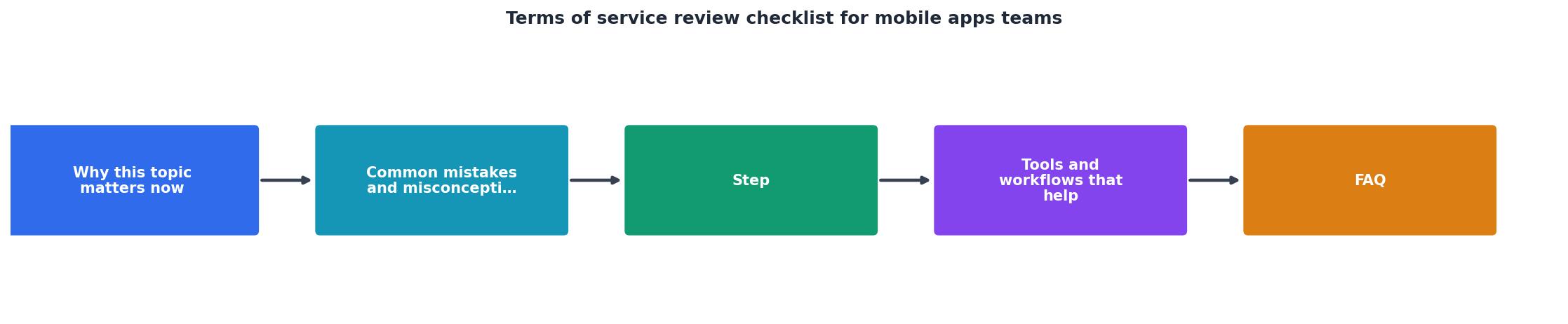
Reviewing terms should be a team effort, not a lawyer-only task. Here's a practical workflow:
- Assign ownership, Pick a product lead or compliance officer to own the audit and schedule time monthly.
- Gather documents, Collect your current terms, privacy policy, any vendor data-processing agreements (for Firebase, payment processors, analytics tools), and your latest app changelog.
- Run an automated scan, Use Terms Doctor or a similar tool to flag compliance gaps in minutes. Document the score (A–F grade) and any red-flag categories.
- Walk through the app, Test user flows end-to-end: onboarding, billing, data permissions, cancellation, support contact. Note where the app's behavior doesn't match the terms.
- Draft updates, Create a change log of required updates. Prioritize: fix app store policy violations first, then dark patterns and hidden costs, then general clarity improvements.
- Get legal review, If your app handles payment, health data, location, or biometrics, run updated terms past a lawyer who knows app law and your jurisdiction.
- Coordinate release, Update your app store listing, website, and in-app terms simultaneously. Notify existing users of material changes per your terms.
- Schedule recurring audits, Set a calendar reminder to review terms every 6 months, or whenever you add SDKs, change data practices, or enter a new market.
Red flags: what to fix first
Some terms problems are more urgent than others. If your app has any of these, fix them before your next release:
- Hidden or unclear auto-renewal: If users aren't seeing a clear price, frequency, and how to cancel before they're charged, you're violating app store rules and federal law (ROSCA in the US, similar laws abroad).
- No working cancellation link: If canceling takes more effort than subscribing, or if the cancel button doesn't work, that's a legal liability.
- Forced arbitration without an opt-out: Many users see this as a dealbreaker. If you use arbitration, always include a 30-day window for users to opt out and go to court instead.
- Data sharing with AI companies not disclosed: If your app trains an AI model on user data, you must disclose this clearly. "We use AI" is not specific enough; name the tool and explain how data is used.
- No privacy policy, or a generic one that doesn't match your app: If your privacy policy doesn't explain what your app actually collects, users and regulators will call you out.
- Age gate missing, but app handles children's data: If your app is used by kids and you're not complying with COPPA, that's a federal violation.
FAQ
Frequently Asked Questions
Get smart about your app's terms
Your app's terms of service is your clearest promise to users. It builds trust, keeps you compliant with app stores and regulators, and protects both sides if something goes wrong. But it only works if you actually read it, understand it, and keep it current.
Use this checklist quarterly. Test your app's flows end-to-end to make sure the terms match reality. When in doubt about whether a clause is legal in your jurisdiction, consult a lawyer who knows app law. And try the free Terms Doctor extension, it's a quick way to scan your terms against 101 consumer-protection checks, get an A–F grade, and see exactly where you're exposed. Terms Doctor works on Chrome, Edge, Brave, Opera, and Vivaldi, and it's free to download. No registration, no credit card. Just paste your terms, scan, and act on what you find. Your users will notice, and so will regulators.
Remember: Terms Doctor's automated checks are not legal advice. Always have a qualified attorney review your terms before launch, especially if you handle payment, health data, or children's information.
Try Terms Doctor Today
Get an instant A–F grade on your app's terms of service. Scan for hidden auto-renewal clauses, forced arbitration, AI training disclosures, and 98 other consumer-protection risks—all in seconds, completely free.
Additional Resources
- How to Create Clear, Enforceable App Terms and Conditions - Learn how to draft effective app terms and conditions, with detailed explanations, must-have clauses, and real examples.
- Microsoft Services Agreement - The Microsoft Services Agreement contains binding arbitration and class action waiver terms that apply to U.S. residents. You and we agree to ...
- Mobile App Terms of Service Checklist for SaaS, Ecommerce - This guide explains what your mobile app terms of service should cover, where businesses often go wrong, and what to check before launching or ...
Ready to Read Terms Before You Sign?
Terms Doctor finds terms of service on any site and grades them A-F in seconds.
Get Started“Terms Doctor flagged forced arbitration and AI training clauses in seconds. I finally know what I am agreeing to.”
Privacy-conscious shopper