Privacy policy review checklist for B2B SaaS teams
When your team adopts a new SaaS tool, whether it's a project management platform, analytics suite, or AI assistant, you're signing more than a contract. You're

Photo by Mikhail Nilov from Pexels
When your team adopts a new SaaS tool, whether it's a project management platform, analytics suite, or AI assistant, you're signing more than a contract. You're also agreeing to a privacy policy that dictates how your data, your users' data, and sometimes your company's proprietary information are handled. For B2B teams, skipping the privacy policy review isn't just risky; it's negligent. Yet most teams do skip it, relying on vague assumptions that "it's probably standard."
This checklist changes that. We'll walk you through the exact clauses, red flags, and questions that turn a 15-minute skim into a thorough, defensible privacy policy review, without needing a lawyer for every tool.
TL;DR- Privacy policies dictate how vendors handle employee, customer, and company data; reviewing them is a compliance and security necessity for B2B teams.
- Use a standardized checklist to audit data collection, third-party sharing, retention practices, AI training, and auto-renewal clauses.
- Watch for forced arbitration, data sale loopholes, vague retention periods, and clauses that reserve the right to change terms unilaterally.
- Track policy changes over time and involve legal, security, and procurement in the review process.
- Terms Doctor's A-F grading and 101 consumer-protection checks automate the discovery and flagging of risky clauses in seconds.
Why B2B teams must review privacy policies

A privacy policy is a legal contract that binds you the moment you sign up or click "I agree." It tells you:
- What data the vendor collects, login credentials, email addresses, company name, IP addresses, usage patterns, and sometimes payment information.
- Who sees that data, the vendor's own staff, third-party analytics providers, subprocessors in other countries, or even AI training systems.
- How long they keep it, days, years, forever, or "as long as your account exists."
- What happens if you leave, do they delete it, anonymize it, or retain backups indefinitely?
- Whether they can sell it, to marketers, brokers, or other companies, even with an "anonymized" label.
- Employee personal data (full names, email addresses tied to real identities)
- Customer or prospect data (if you store it in the tool)
- Competitive intelligence (project names, team sizes, feature roadmaps visible in usage logs)
- Payment and billing details
- Compliance obligations (GDPR, CCPA, HIPAA, SOC 2) that your company must meet but the vendor may not
Without a privacy policy review, you risk data breaches you didn't authorize, regulatory fines your company has to pay, and customer trust erosion. The good news: a structured checklist makes the review fast and repeatable.
The privacy policy review checklist

Use this checklist to audit any privacy policy before signing a contract or onboarding a new tool. Print it, share it with your legal and security teams, and update it as new policies are published.
Privacy Policy Review Checklist for B2B SaaS
Your progress is saved automatically in your browser.
Key takeaway: A privacy policy review is not optional for B2B teams, it's a mandatory part of vendor onboarding that protects employee data, customer information, and company reputation.
Red flags that demand escalation

Not every risky clause is a deal-breaker, but these five red flags warrant legal review or vendor negotiation before you sign:
- "We may sell or share your data with third parties for marketing purposes", This often appears buried in a subsection. It means your company's or employees' data could end up in the hands of data brokers or competitors. Ask the vendor to exclude B2B users or to require explicit opt-in.
- "We use your data to train our AI models", If the vendor uses your customer records, project names, or proprietary queries to improve their AI, you're donating your competitive advantage. Demand opt-out language or a separate data processing addendum (DPA).
- "We retain your data indefinitely" or "as long as we find it useful", Retention without limits creates liability. Insist on a specific deletion timeline (e.g., 30 days after account closure) and written proof of deletion.
- "Any disputes must be resolved through binding arbitration", Arbitration clauses strip you of your right to sue in court, appeal, or join class actions. If the vendor loses your data, you're locked into arbitration. Push back or walk away.
- "We may change this policy at any time without notice", If the vendor can change terms unilaterally and without notifying you, they can weaken your privacy protections mid-contract. Demand either mutual consent for changes or a 30-day notice period with a right to cancel penalty-free.
"Building a library of all your applications should be number one on your goal list.">, The Essential SaaS Compliance Checklist for 2026
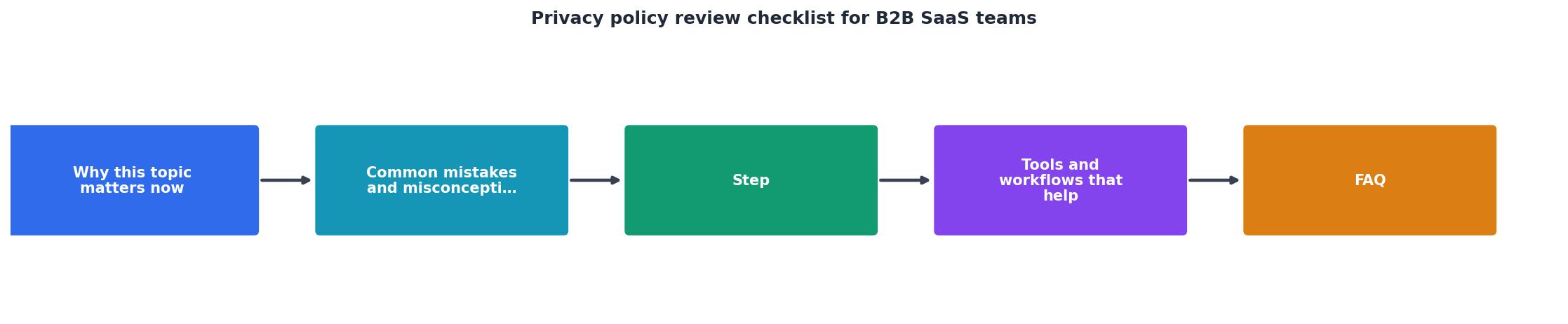
Step-by-step review process
1. Locate and export the policy
Find the privacy policy URL (usually at the bottom of the vendor's website under "Privacy" or "Legal"). Many vendors hide it behind a login wall or bury the link in footer text. Export or save a PDF copy with the date and version number, you'll need it for audit trails.
2. Map data flows
Create a simple table or diagram showing:- What data your team will input into the tool (employee names, emails, customer records, file uploads)
- Where that data will be stored (US, EU, Asia-Pacific)
- Who accesses it (vendor staff, subprocessors, AI systems)
- How long it's retained
3. Extract key clauses
Copy the relevant sections into a shared document organized by topic:- Data collection and use
- Third-party sharing and subprocessors
- Data retention and deletion
- User rights (access, correction, portability)
- International transfers
- Breach notification
- Dispute resolution and liability
4. Compare against your policies
Does the vendor's privacy policy align with your company's data handling policies, security standards, and compliance obligations? If not, flag it for legal review and negotiate amendments.
5. Document your decision
Record your review in a centralized vendor management tool or spreadsheet with:- Vendor name and tool
- Policy version and date reviewed
- Review outcome (approved, approved with conditions, rejected, awaiting legal review)
- Red flags and mitigation steps
- Approval sign-off (name, title, date)
6. Set a review reminder
Privacy policies change. Schedule an annual review, or more frequently if the vendor announces policy updates. Many vendors announce changes in release notes or email.
What to do when you find a problem
If your review uncovers a red flag, you have options:
- Negotiate: Send a short email to the vendor's legal or sales team requesting an amendment to the privacy policy or a Data Processing Addendum (DPA). Many vendors will negotiate for larger contracts.
- Accept with conditions: If the risk is low, document your acceptance and implement compensating controls (e.g., encrypt sensitive data before uploading, limit who has access, audit logs).
- Reject and switch: If the vendor won't budge and the red flag is serious (e.g., data sale without consent, no deletion rights), reject the tool and find an alternative.
- Escalate to legal: For high-risk clauses (forced arbitration, liability caps, AI training on proprietary data), involve your legal team before signing.
Automating the review with Terms Doctor
Reviewing every privacy policy manually is time-consuming. The free Terms Doctor browser extension automates the discovery and grading of privacy policies in seconds. When you visit a vendor's website or log into a SaaS tool, Terms Doctor:
- Finds the privacy policy and terms of service automatically (no hunting for links)
- Runs 101 consumer-protection checks against the policy, flagging forced arbitration, data sale clauses, auto-renewal traps, AI training on user data, and more
- Grades the terms A-F based on fairness and transparency
- Highlights specific risky clauses and explains them in plain language
- Tracks policy changes over time so you see when a vendor weakens your protections
- Exports reports for your vendor management and legal teams
FAQ
Frequently Asked Questions
Wrapping up
A privacy policy review is not a legal formality, it's a core part of B2B vendor management. By following this checklist, mapping data flows, and escalating red flags to your legal and security teams, you protect your company's data, your employees' privacy, and your compliance posture.
Terms Doctor's free extension brings this review process into the 21st century, spotting risky clauses automatically and grading policies in real time. Use it during vendor evaluation, not after signing. Your future self, and your legal team, will thank you.
For more guidance on vendor security and compliance, explore the Terms Doctor resources section or install the free extension. Start auditing your existing vendor policies today.
Note: This article is not legal advice. Consult your legal team before making vendor decisions based on policy reviews.
Additional Resources
- GDPR Compliance for SaaS: Complete 2025 Guide ... - This comprehensive checklist provides step-by-step guidance for achieving complete GDPR compliance, with specific focus on challenges facing B2B ...
- The Essential SaaS Compliance Checklist for 2026 - A practical SaaS compliance guide with key regulations and a checklist for security, data privacy, and financial compliance.
- The Ultimate Privacy Policy Checklist - 1. Your business and contact information · 2. The categories of data you collect · 3. The sources of the data or how you collect data · 4. The ...
Ready to Read Terms Before You Sign?
Terms Doctor finds terms of service on any site and grades them A-F in seconds.
Get Started“Terms Doctor flagged forced arbitration and AI training clauses in seconds. I finally know what I am agreeing to.”
Privacy-conscious shopper