Cookie policy review checklist for AI tools teams
When your team adopts a new AI tool, whether it's a code assistant, design platform, or data analyzer, the terms of service and cookie policy often come last on the review list. But for privacy-conscious teams, especially those handling sensitive client data or working in regulated industries, skipping this step can expose your organization to data misuse, compliance violations, and unexpected data-sharing arrangements. This checklist walks you through the critical cookie and data-handling claus

Photo by cottonbro studio from Pexels
When your team adopts a new AI tool, whether it's a code assistant, design platform, or data analyzer, the terms of service and cookie policy often come last on the review list. But for privacy-conscious teams, especially those handling sensitive client data or working in regulated industries, skipping this step can expose your organization to data misuse, compliance violations, and unexpected data-sharing arrangements. This checklist walks you through the critical cookie and data-handling clauses every AI tools team should verify before signing up.
TL;DR
- Cookie policies for AI tools often allow data collection for model training, analytics, and third-party sharing, read them carefully before adoption.
- Look for red flags: indefinite data retention, vague "service improvement" language, and automatic renewal clauses buried in fine print.
- Use a systematic checklist to audit each tool's privacy terms, compare practices across vendors, and document your findings for compliance.
- Terms Doctor can speed up this process by automatically scanning and grading cookie policies, flagging forced arbitration, auto-renewal, and AI training claims.
- Even "free" AI tools monetize user data; understand the trade-off before your team's work becomes training data.
Why AI tools teams must review cookie policies now

AI tools are no longer optional luxuries, they're core infrastructure for design teams, developers, writers, and researchers. But the rush to adopt them often means glossing over how these tools handle data.
Here's the reality: many free or low-cost AI platforms fund themselves by selling insights derived from your usage data. ChatGPT, GitHub Copilot, Midjourney, and others explicitly reserve the right to use uploaded content for model training (unless you pay extra). Proprietary or enterprise versions often do the same, just with different opt-out structures. Meanwhile, cookies track your session, preferences, and device fingerprint across visits and integrations.
For teams that work with client data, patient records, financial information, or trade secrets, this matters. A careless AI tool choice can violate:
- GDPR (if you're processing EU residents' data without proper Data Processing Agreements)
- HIPAA (if client health data lands in an AI vendor's training pipeline)
- Industry compliance (financial services, legal, government contracting)
- Client contracts (which often forbid unauthorized third-party processing)
Terms Doctor runs 101 automated checks on any terms of service or cookie policy, including flags for forced arbitration, auto-renewal, data training, and opaque data-sharing language. But you still need a human-readable checklist to contextualize these red flags and make vendor decisions as a team.
Understanding cookie policies for AI tools
Cookies fall into four broad categories, but AI tools often blur the lines:
- Essential cookies, Session IDs, CSRF tokens. You cannot disable these without breaking login.
- Analytics cookies, Track which features you use, how long you stay, page flows. Vendors claim this is "product improvement"; it's also valuable data.
- Advertising and tracking cookies, Used to profile you across sites and target ads. Less common in B2B AI tools, but watch for third-party integrations.
- AI training cookies, Some tools explicitly mention they use cookies to identify you so they can correlate your uploads with your session. This creates a permanent, linkable profile for model training.
Building your cookie policy review checklist

Before signing up, assign one team member to lead the review. This doesn't have to be a lawyer, it should be someone who understands your team's data sensitivity and compliance obligations. Use the checklist below to gather findings, then compare scores across tools before deciding.
Cookie Policy Review for AI Tools Teams
Your progress is saved automatically in your browser.
Let's walk through the high-risk areas in detail.
Data retention and deletion: the hidden cost
Most AI tools bury their data retention policy in a footnote. A typical pattern looks like this:
"We retain your data for the duration of your account and up to [90 days | 1 year | indefinitely] after deletion for backup and legal compliance purposes."
The problem: "legal compliance" is vague. It could mean anything. Meanwhile, your work samples, uploaded documents, or chat histories might be sitting on their servers, potentially accessible to researchers, audited by lawyers, or mined for insights.
What to demand: A specific retention schedule (e.g., "deleted within 30 days") and confirmation that deletion is permanent, not just soft-deleted in a backup.
Red flag: "We retain data indefinitely for product improvement and research." This means your work never truly leaves.
Third-party data sharing and integrations
Cookies often come with invisible partners. When you log into an AI tool using Google, Microsoft, or Apple single sign-on, those vendors get a signal that you visited. If the AI tool integrates with Slack, Zapier, or other platforms, user data flows into those ecosystems too.
Check the privacy policy for:
- Subprocessors list: Does the vendor publish which third parties handle your data? (GDPR requires this.)
- Analytics partners: Google Analytics, Segment, Mixpanel? Each of these sees your activity.
- Research partnerships: Does the vendor share anonymized data with academic labs or other companies?
AI model training: opt-out or opt-in?
This is the biggest differentiator for AI tools teams. Some vendors opt you into training by default (you must actively disable it, often via email request). Others require explicit opt-in (safer, but more friction).
Examples:
- ChatGPT free: Conversations are used for training unless you disable the setting in your account.
- ChatGPT Plus: You can disable training via a toggle; conversations are not used unless you generate them from a Custom GPT you've published.
- GitHub Copilot: Code you write is used for training unless you're on a team plan with different terms.
- Claude (Anthropic): Conversations are not used for training by default; you can participate in research if you opt in.
"IBM found that 97% of organizations reporting AI-related breaches lacked proper access controls.">, AI Audit Checklist 2026: What to Review and When
What to do: If your team handles sensitive data, choose tools that offer explicit opt-out or no-training agreements. Pay for enterprise/team plans if they include these protections. Document your choice and share the decision with the team.
Auto-renewal and payment terms buried in fine print
AI tools often quote a monthly or annual price, then bury language like:
"Your subscription will automatically renew at the end of each billing period. You may cancel anytime, but cancellation is effective only at the end of your current billing cycle."
This creates friction: you cancel on day 1 of a new cycle but still pay for the full month. Some tools make cancellation require a phone call or support ticket, not a simple toggle. Combined with a cookie that remembers your payment method, this is a dark pattern.
What to look for: Clear cancellation instructions (ideally a self-serve toggle), and confirmation that cancellation takes effect immediately, not at the next billing date.
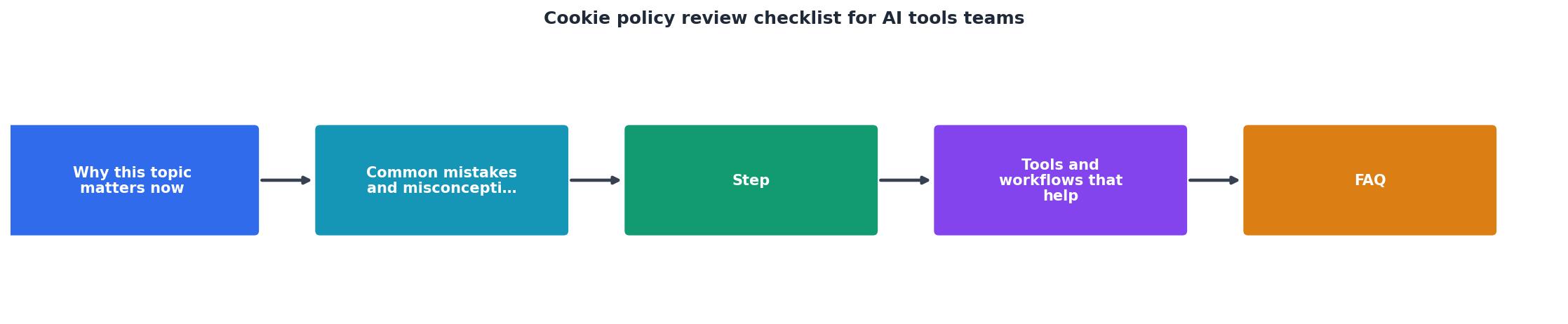
Step-by-step: how to audit an AI tool's cookie policy

Here's a repeatable process to audit any new tool your team wants to adopt:
Phase 1: Intake (15 minutes)
- Visit the tool's website.
- Find the Privacy Policy link (usually footer or
/privacy). - Download or print the policy to a shared document (Google Docs or Notion works).
- Skim for "cookie," "data retention," "training," and "third party."
Phase 2: Terms Doctor scan (5 minutes)
Use the free Terms Doctor browser extension to auto-scan the tool's terms and privacy policy. It will grade the policy A–F and flag red-flag clauses (forced arbitration, auto-renewal, AI training, vague data sharing).
Phase 3: Manual checklist review (20–30 minutes)
Go through the 12-item checklist above. For each item, mark Y/N/Unclear. If you answer "Unclear," send a question to the vendor's privacy email.
Phase 4: Scoring and comparison (10 minutes)
Rate each tool on a simple scale:
- 🟢 Green (Safe): Opt-out or no training; clear deletion; DPA available; no mandatory arbitration.
- 🟡 Yellow (Acceptable): Opt-in training; 30–90 day retention; DPA available on request; arbitration available but not forced.
- 🔴 Red (High risk): Indefinite retention; mandatory training opt-in; no DPA; forced arbitration; vague data sharing.
Phase 5: Team decision and documentation
Document your decision and the reasoning. This becomes your audit trail for compliance reviews and client audits.
When to escalate to legal or compliance
You don't need a lawyer for every tool, but involve one if:
- Your team handles health, financial, or government data.
- Your clients' contracts forbid third-party processing.
- You're in a regulated industry (healthcare, finance, legal).
- The vendor's policy is unusually opaque or hostile (e.g., data sold to third parties with no opt-out).
- You're signing a contract with annual commitment over $10K.
The free tool trap
Free AI tools are tempting, but understand the business model. If a tool is free, you (and your data) are the product. This doesn't automatically make it bad, some vendors are genuinely non-commercial or funded by research grants. But verify:
- Does the vendor have a stated business model and revenue source?
- Can you request a copy of the subprocessors list or data handling terms?
- Is there a way to pay for a private version with stricter terms?
FAQ
Frequently Asked Questions
Get started with Terms Doctor
Reading cookie policies is tedious, but it's a one-time investment per tool that protects your team, your clients, and your organization's reputation. Terms Doctor accelerates this process by automatically grading privacy policies and highlighting red flags, arbitration clauses, auto-renewal traps, AI training opt-ins, and vague data-sharing language. The free browser extension works on any website, any terms of service, any cookie policy.
Download Terms Doctor for free on Chrome, Edge, Brave, Opera, and Vivaldi. Start with your team's most-used AI tools and build a vendor registry. Share your findings with colleagues so everyone understands the privacy trade-offs of the tools you're using. And remember: Terms Doctor's automated checks are not legal advice, but they're a fast way to spot issues before you sign.
Additional Resources
- AI Audit Checklist 2026: What to Review and When - Use this AI audit checklist to review model access, agent governance, cost controls, and compliance evidence across your enterprise AI ...
- Cookie Compliance Review Checklist - This guide provides a structured checklist for conducting periodic reviews to keep your Secure Privacy consent management configuration up to ...
- AI Adoption Checklist for Legal Teams - Use the checklist to guide AI tool evaluations, identify potential risks, and determine where additional review may be needed. ry StatementCookies PolicyCookies
Ready to Read Terms Before You Sign?
Terms Doctor finds terms of service on any site and grades them A-F in seconds.
Get Started“Terms Doctor flagged forced arbitration and AI training clauses in seconds. I finally know what I am agreeing to.”
Privacy-conscious shopper