Terms of Service Checklist for Online Marketplaces
When you buy or sell on an online marketplace, whether it's a freelance platform, resale site, or dropshipping network, you're agreeing to terms of service you've probably never fully read. Marketplaces bury crucial rules about fees, dispute resolution, data use, and account termination in dense legal prose. This checklist helps you spot the red flags, understand what you're really signing up for, and protect yourself before clicking "I Agree."

Photo by Markus Winkler from Pexels
When you buy or sell on an online marketplace, whether it's a freelance platform, resale site, or dropshipping network, you're agreeing to terms of service you've probably never fully read. Marketplaces bury crucial rules about fees, dispute resolution, data use, and account termination in dense legal prose. This checklist helps you spot the red flags, understand what you're really signing up for, and protect yourself before clicking "I Agree."
TL;DR
- Online marketplaces often hide auto-renewal clauses, forced arbitration, and data-sharing rules in their terms, read the payment and dispute sections first.
- Check for clear refund policies, seller protection guarantees, and how your personal data is used or shared with third parties.
- Watch for one-sided account termination clauses, hidden fees, and clauses that let the platform use your content without compensation.
- Use a tool like Terms Doctor to automatically flag 101 consumer-protection issues and grade marketplace ToS on transparency and fairness.
- Always export or screenshot key clauses; marketplace terms change frequently, and you need proof of what you agreed to.
Why Marketplace Terms Matter

Online marketplaces are built on speed and convenience. You sign up in minutes, upload your listings or profile, and start transacting. But that speed comes at a price: you're entering a binding legal contract with a platform that can change the rules, freeze your account, or claim rights to your content, often without warning.
Unlike shopping on a single retailer's website, marketplace terms of service set the rules for how you compete with other sellers, how disputes are resolved, what happens if you're accused of violating community standards, and how your data flows through the system. A single vague clause can cost you thousands in frozen payments or unpaid sales commissions.
Key takeaway: Marketplace terms are not just legal boilerplate, they define your rights, your risks, and your exit options when something goes wrong.
Essential Sections to Review First
Before diving into every section, focus on these five critical areas. Most marketplace disputes stem from misunderstandings about one of these:
1. Payment, Fees, and Withdrawal Rules
Marketplaces make money by taking a cut of every transaction. But "a cut" can mean:
- Transaction fees (2–5% of the sale price, standard across most platforms)
- Subscription or membership fees (to unlock premium features or visibility)
- Processing fees (if you withdraw money to your bank account)
- Currency conversion fees (if you work internationally)
- Refund-reversal fees (if a buyer disputes the charge)
2. Dispute Resolution and Arbitration
This is where many sellers get trapped. Most marketplaces include a clause like:
"Any disputes shall be resolved through binding arbitration under the rules of [some arbitration body], not in court."
What this means: If you're cheated by a buyer or the platform itself, you can't sue in small claims court. You must pay for a private arbitrator, and the arbitrator's decision is final, no appeals, even if the ruling is unfair. Arbitration can cost $500–$5,000 just to file.
Action: Search for "arbitration," "dispute," "litigation," and "class action." Note whether the platform allows class actions (collective lawsuits) or if you must arbitrate individually. This is a red flag if the marketplace prohibits you from joining a group lawsuit about a widespread problem (like withheld payments).
3. Account Termination and Suspension
Most marketplace terms let the platform terminate your account "for any reason" or "for violation of these terms", but "violation" is vaguely defined. You could lose access to:
- All your transaction history and seller ratings
- Pending payments and refunds
- Your product listings
- Your customer data (if you've built a following)
- Whether you get written notice before or only after suspension
- How long you have to appeal or respond
- Whether you can withdraw pending earnings
- If the platform keeps a portion of your account balance
4. Data Use and Third-Party Sharing
Marketplaces collect enormous amounts of data: your sales history, customer behavior, IP address, payment method, location, communication patterns. The terms dictate what the platform can do with this data.
Red flags:- "We may share your data with our partners and affiliates for marketing purposes."
- "Your data may be used to train our AI models" (without compensation).
- No clear opt-out for third-party data sales.
- Indefinite data retention ("We keep your data for as long as we deem necessary").
5. Content Ownership and License
When you upload product photos, descriptions, or reviews to a marketplace, you retain copyright, but you're almost always granting the platform a broad license to use that content.
Common language:- "You grant us a worldwide, royalty-free, perpetual license to use, copy, modify, and distribute your content."
- "We may use your content in advertising and marketing without additional compensation."
Red-Flag Checklist for Marketplace Terms
Marketplace Terms Red-Flag Checklist
Your progress is saved automatically in your browser.
Consumer Rights You Should Expect

Not every marketplace is created equal. Some platforms go further to protect buyers and sellers. Here's what you should look for:
Seller Protection Guarantees
Look for explicit commitments like:
- Payment security: "We hold funds in escrow until the buyer confirms receipt" (protects you from non-payment).
- Chargeback protection: "We'll defend you if a buyer disputes the charge without legitimate cause."
- Seller insurance: "Your account and earnings are insured up to $X in case of platform failure or fraud."
Transparency in Changes
Good marketplaces commit to:
- Clear notification of any fee increases (30+ days' notice is standard).
- Publicly accessible archive of past terms (so you can track what changed).
- Explanation of why rules were updated (not silent changes).
Data Protection Commitments
Strong terms include:
- Clear data retention policy: "We delete your data 12 months after account closure unless required by law."
- Explicit opt-out for third-party data sales.
- GDPR or CCPA compliance language if you sell internationally.
"Many startups and small businesses make avoidable mistakes when drafting or updating their marketplace terms of service.">, Marketplace Terms Of Service: US Guide For Online Platforms
Step-by-Step Review Process

Use this workflow to systematically review any marketplace terms before you sign up or continue selling:
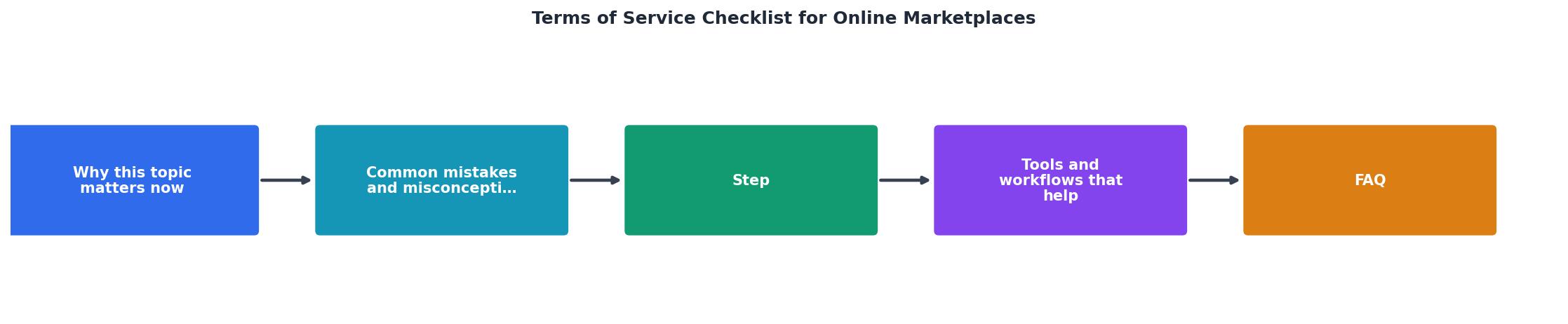
- Open the marketplace's Terms of Service page in your browser.
- Use your browser's Print function (Ctrl+P or Cmd+P) to save as PDF, this locks the document in time, preserving what you read today.
- Name the file with the platform name and date:
Etsy_ToS_2025-09-02.pdf.
- Most ToS pages include a clickable index at the top (or use your PDF's outline feature).
- Jump to the sections listed in "Essential Sections to Review First" above.
- Note the section numbers for later reference.
- Open the PDF and use Ctrl+F (or Cmd+F) to search for keywords: "arbitration," "termination," "fees," "data," "AI," "license," "perpetual," "binding."
- Highlight or copy any passage that matches the red-flag checklist.
- If you find confusing language, re-read the surrounding paragraphs for context.
- Open a Google Doc or Word file.
- List the five essential sections and your findings:
- Fees: 5% transaction fee, $0.50 withdrawal fee, 30-day notice for increases
- Disputes: Mandatory arbitration, individual only (no class action)
- Termination: Account closure with 10-day appeal period; pending earnings paid within 30 days
- Data: Retained for 2 years after closure; not sold to third parties; AI training opt-out available
- Content: Perpetual license to use photos; your copyright retained
- Share this with an accountant or small-business mentor for a second opinion.
- Marketplaces update terms frequently (often 1–2 times per year).
- Set a calendar reminder to re-read the terms every January (or after receiving a "Terms Updated" email).
- Use Terms Doctor to track changes automatically, the extension alerts you when a platform's terms shift.
How Terms Doctor Helps
Manually reading marketplace terms is time-consuming and easy to miss. Terms Doctor automates the heavy lifting:
- Instant discovery: The extension finds and highlights a marketplace's ToS, privacy policy, and return policy on any website.
- 101 checks: Automatically scans for forced arbitration, auto-renewal, AI training clauses, data sales, account termination language, and more.
- A-F grade: Rates the fairness and transparency of the terms in plain language.
- Change tracking: Alerts you when a marketplace updates its terms so you don't miss important changes.
- Export reports: Generate a PDF summary for your records or to share with your accountant.
FAQ
Frequently Asked Questions
- Contact support using the in-app help center and ask for a detailed explanation in writing.
- Review the terms to see what violations could trigger suspension.
- If you believe it's an error, respond formally within the appeal period (if one exists).
- Keep all correspondence.
- If the marketplace won't budge and you've lost significant income, consult a small-business lawyer about your options (small claims court, complaints to the FTC, or arbitration if that's required).
Protect Yourself Before You Sign
Reading marketplace terms feels tedious, but 15 minutes of review can save you thousands in lost earnings, frozen accounts, or unwanted data use. Start with the five essential sections, run the terms through Terms Doctor for an instant red-flag scan, and keep a PDF copy for your records.
Remember: automated checks are not legal advice. If you're selling high volumes or in a regulated industry (food, health, financial services), consider having a lawyer review the terms once per year.
Online marketplaces are effective tools for reaching buyers and building businesses. They're also businesses themselves, and their terms reflect their interests, not always yours. By reading and understanding what you're signing, you take control of the relationship.
Additional Resources
- Online marketplace terms between operator and suppliers) - Standard terms, under which an online marketplace operator agrees to list a third party business supplier's products on its platform and to process orders ...
- Legal Agreements for Marketplaces - Some of the basic legal policies an online marketplace should have are a Privacy Policy, a Terms and Conditions Agreement, a Return and Refund ...
- Marketplace Terms Of Service: US Guide For Online Platforms - A practical US guide to marketplace terms of service, covering website terms, customer notices, FTC rules and when attorney review can help.
Ready to Read Terms Before You Sign?
Terms Doctor finds terms of service on any site and grades them A-F in seconds.
Get Started“Terms Doctor flagged forced arbitration and AI training clauses in seconds. I finally know what I am agreeing to.”
Privacy-conscious shopper